
Land record management in Jharkhand has undergone a significant shift toward digital access over the past several years. Under this initiative, the Department of Revenue and Land Reforms, Government of Jharkhand, developed and operates the Jharbhoomi Naksha portal. As of 2026, the platform covers all 24 districts and handles land records, cadastral maps, and mutation applications through a single online system.
This article covers the Jharbhoomi Naksha portal in detail, including how to access land records, view Bhu Naksha maps, apply for land mutation, download PDF maps, and use the mobile app.
Table of Contents
What is Jharbhoomi Naksha?
Jharbhoomi Naksha is a GIS-based land records system integrated with Jharkhand’s state revenue database. The portal brings together cadastral mapping, ownership records, and revenue data under one platform. Citizens can search by khata number, khasra number, or owner name without visiting any government office.
Within the portal, Jharbhoomi Naksha refers to the digital cadastral mapping component. It displays plot boundaries, land parcel dimensions, and ownership details in an interactive map format. This map-based interface makes it easier to identify and verify specific land parcels across any district in Jharkhand.
Key Features of the Jharbhoomi Portal
The Jharbhoomi portal brings together multiple land-related services that previously required separate office visits. All of the following are accessible through a single login at jharbhoomi.jharkhand.gov.in:
- Record of Rights (ROR): View and download ownership documents using khata or khasra numbers.
- Land Mutation: Submit, track, and manage ownership transfer applications online.
- Bhu Naksha (Cadastral Maps): Access interactive, district-wise digital land maps with plot boundaries.
- Revenue and Tax Records: View land tax details linked to individual plot numbers.
- Application Tracking: Monitor mutation and grievance status through a dedicated tracking section.
This consolidation reduces the need for intermediaries and makes land data verifiable at any time.
How to Check Jharkhand Land Records Online in 2026
Land records in Jharkhand are accessible directly through the Jharbhoomi portal without requiring any physical documentation at the counter. The process is straightforward and takes only a few steps:
- Visit Jharbhoomi Naksha on any browser.
- Select “View Your Account” or “ROR View” on the homepage.
- Choose the district, block, and village from the dropdown menus.
- Enter the khata number or plot number in the search field.
- Click “Search” to retrieve the land record.
- Owner name, land type, area, and revenue details appear on screen.
Records can be printed or saved directly from the portal for documentation purposes.
How to Access Bhu Naksha Jharkhand in 2026
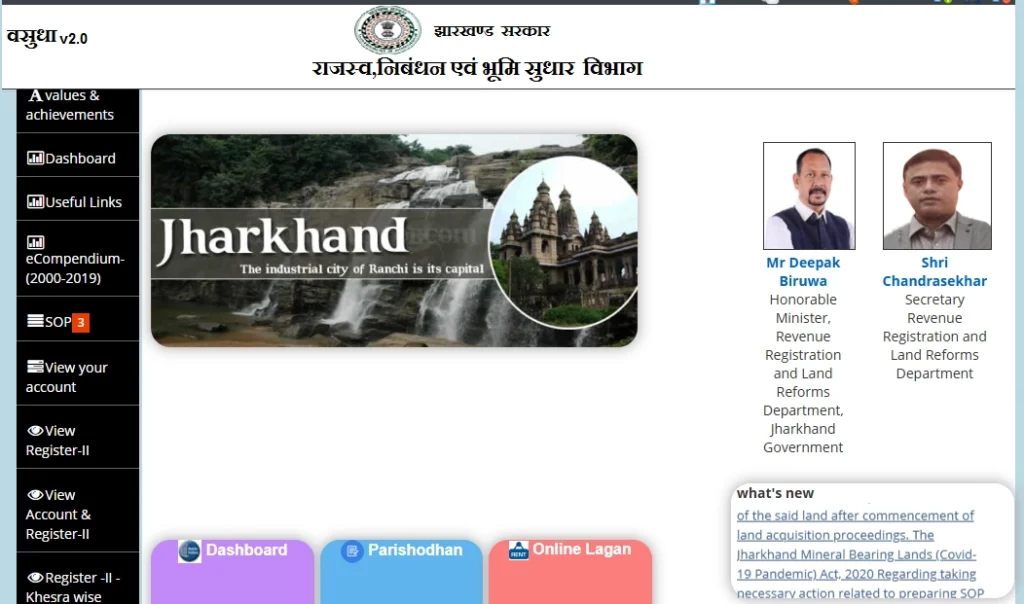
For those looking to view land boundaries and plot layouts, Bhu Naksha Jharkhand provides plot-level cadastral maps across all 24 districts. Accessing the map section involves a few simple steps:
- Open Jharbhoomi Naksha.
- Select the “Bhu Naksha” tab from the navigation menu.
- Choose the district and block from the available options.
- The digital map loads for the selected area.
- Click any plot to view its boundary and ownership details.
District-Wise Bhu Naksha Availability in Jharkhand
Bhu Naksha data is publicly accessible for all major districts in Jharkhand. The table below lists districts where cadastral map data is currently available through the portal:
| District | Bhu Naksha Status |
|---|---|
| Ranchi | Available |
| Dumka | Available |
| Ramgarh | Available |
| Chatra | Available |
| East Singhbhum | Available |
| Lohardaga | Available |
| Pakur | Available |
| Garhwa | Available |
| Chaibasa (West Singhbhum) | Available |
| Hazaribagh | Available |
Each district entry includes plot boundaries, ownership details, and complete cadastral records.
What is Land Mutation in Jharkhand?
When a property changes hands through sale, inheritance, gift deed, or court order, the ownership details in official revenue records must be updated. This update process is known as land mutation. The Department of Revenue and Land Reforms, Government of Jharkhand, processes all mutation requests through the Jharbhoomi portal.
Mutation updates the Record of Rights (ROR) to reflect the new owner’s name. Without completed mutation, the ownership transfer remains unrecognized in official land revenue records.
Online Mutation Application Process on Jharbhoomi
The Jharbhoomi Naksha portal accepts mutation applications digitally, removing the need for in-person submission. The application process follows these steps:
- Log in to Jharbhoomi Naksha with registered credentials.
- Navigate to the Mutation section from the services menu.
- Fill in the application form with plot number, khata number, and transfer details.
- Upload the sale deed, identity proof, and existing ownership documents.
- Pay the applicable mutation fee through the online payment gateway.
- Submit the form and note the acknowledgment number for status tracking.
The acknowledgment number enables real-time tracking of mutation status directly on the portal.
How to Download Bhu Naksha Jharkhand PDF
Cadastral maps available on the Bhu Naksha portal can be saved as PDF files for offline use. These downloaded maps serve as supporting documents in property transactions and legal proceedings. The download process involves:
- Open the Bhu Naksha section at jharbhoomi.jharkhand.gov.in.
- Select the district and block, then locate the plot on the map.
- Click the plot to highlight its boundary and details.
- Select “Print” from the map interface toolbar.
- Choose PDF format and save the file to the device.
Bhu Naksha Jharkhand App
For users who prefer mobile access, the Bhu Naksha Jharkhand app brings land map functionality to Android devices. The app connects directly to the Jharbhoomi database and supports:
- Plot-wise search by khata and khasra number
- Interactive cadastral map viewing with boundary tools
- Digital signature verification on downloaded documents
Steps to download the app:
- Open Google Play Store on an Android device.
- Search for “Bhu Naksha Jharkhand”.
- Tap “Install” on the official app listing.
- Log in using registered Jharbhoomi credentials.
Conclusion
Jharbhoomi Naksha brings land records, cadastral maps, and mutation services into a single accessible platform for Jharkhand residents. Operated by the Department of Revenue and Land Reforms at jharbhoomi.jharkhand.gov.in, the portal covers all 24 districts and supports everything from ROR access to online mutation applications. For more information on land records and property resources across India, visit Openplot.
Frequently Asked Questions
1. What is the official website for Jharbhoomi Naksha?
The official portal is Jharbhoomi Naksha, maintained by the Department of Revenue and Land Reforms, Government of Jharkhand. It provides access to land records, mutation services, and Bhu Naksha maps.
2. How are land records accessed through the Jharbhoomi Naksha portal?
Land records are retrieved by selecting the ROR View option on jharbhoomi.jharkhand.gov.in. The district, block, and khata or plot number are required to complete the search.
3. What documents are required for online mutation in Jharkhand?
A sale deed, identity proof of the new owner, and existing ownership documents are required. All documents are submitted digitally through the Jharbhoomi mutation application form.
4. Is Bhu Naksha available for all districts in Jharkhand?
Bhu Naksha data is accessible for all 24 districts of Jharkhand through the official portal. Each district entry includes plot boundaries, cadastral maps, and ownership records.
5. Can Bhu Naksha maps be downloaded as PDF files?
PDF downloads are available through the Print option in the Bhu Naksha map interface. The downloaded file contains plot boundaries and ownership data for offline use.
| Also read How to Access the Bhulekh Portal for Land Records in Odisha? The Bhulekh Portal is an online land record system implemented by the Government of Odisha to simplify the process of accessing land records for citizens. With just a few clicks, you can retrieve essential details about your land, like ROR (Record of Rights), plot information, and Khata details. How to Navigate the Dharitree Assam Portal for Land Records? The Dharitree Assam Portal is a user-friendly platform that allows users to access information related to land records in Assam. By simply entering the required details, users can easily search for and retrieve land records such as ownership details, survey numbers, and mutation status. The Ultimate Guide for IGRS Haryana, Jamabandi In recent years, Haryana has made significant strides in digitizing land and property-related services, simplifying access to crucial information for its citizens. The Integrated Grievance Redressal System (IGRS) in Haryana stands out as a game-changer in this domain, offering seamless access to Jamabandi (land records), property registration details, and stamp duty information. |